
TypeScript Language Server Automatic Restart
A simple solution that works without an extension

The standard things we do in TypeScript projects include the following two items:
We have an npm script that upgrades all dependencies
We have an npm script that confirms the code is ready to commit
In each of these cases we wipe the node_modules directory. And since we are using pnpm, we also wipe its cache directory for good measure. This creates a well-define state for installing all packages, building the artifacts and then running the full test suite.
Since we also use standardized dev containers, this approach removes most of the variability of the build process. This is one key element for a high-quality continuous integration (CI) step that is part of the delivery pipeline.
Finally, we are using VS Code as our standard IDE. This setup doesn’t prevent the use of other IDE’s in case one of the software engineers prefers a different IDE. The only requirement we have for IDE’s is that it supports remote development in dev containers. And for each of our repositories we also require that the VS Code setup is always working, so that we one standard IDE that is set up in working order across all our source code repositories.
The Problem
TypeScript support in VS Code is provided by the TypeScript Language Server, or short “tsserver”. By and large it works fine but it has a few short comings.
One of the short comings is that it doesn’t notice if a node_modules directory has been restored. If it can’t find the node_modules directory, tsserver will generate a large number of errors in pretty much all TypeScript files and even in some configuration files. This is desired behavior. It results in a lot of filenames shown with red squiggly lines in editor windows that you may have open showing TypeScript code. This picture give you an idea:
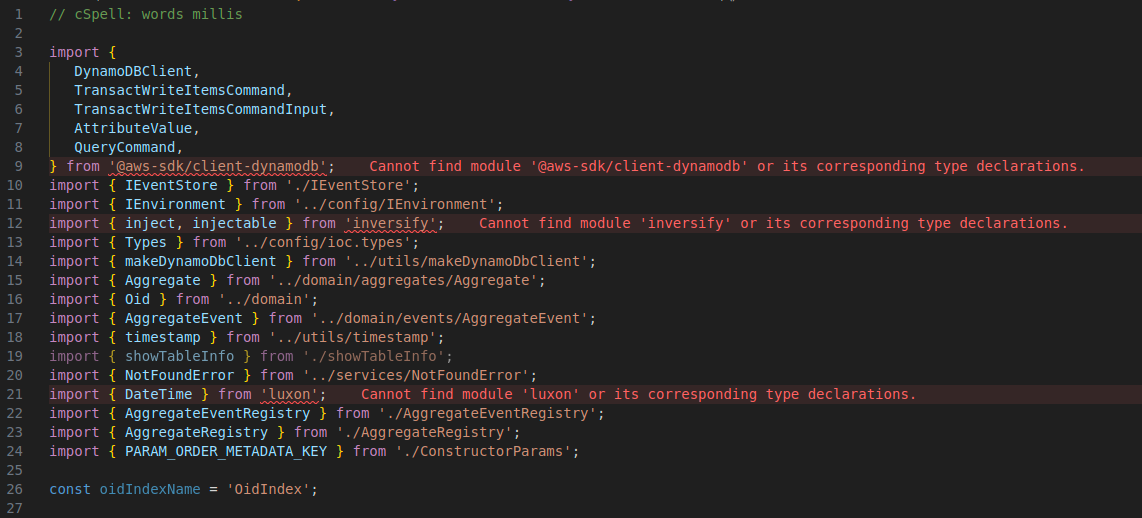
What tsserver does not do is re-reading from node_modules once the directory has been restored. You need to restart tsserver. Then it will re-read the content of node_modules and – unless there are not genuine issues – the error message will disappear.
One way to restart tsserver is using the command palette. If you used the command a few times it will then appear in the frequently used section which makes it somewhat more accessible:
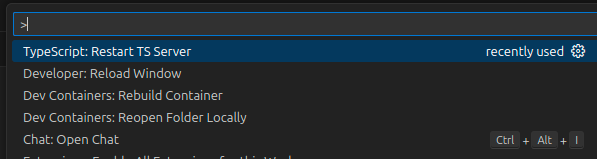
However, in our setup we wanted to automate this because we often run the script that confirms the code is ready to commit. We have called that script “pre-commit”. Therefore we often use “pnpm run pre-commit” because we commit frequently, some developers several dozen of times per day.
We needed a better solution that took care of this manual, repetitive task.
Keep reading with a 7-day free trial
Subscribe to GeekCoder Journal to keep reading this post and get 7 days of free access to the full post archives.